Removing UTF8 Gremlins

If you work with documents from many different sources, you’ve probably seen this before:

That’s good.

“Oh no”, you think, “A utf-8 encoding problem.” That three-letter combo should be a single close-quote, like this:

That’s good.

Sometimes the problem is that your application is reading the file as a win-1252 (or cp1252, or the kinda-sorta iso-8859-1 used on the web). In this case the solution is easy: instruct your application to reopen the file as utf8.

But sometimes, your file really does say “’”, even when decoded as utf-8. How this happens is that someone took some utf8 text, pasted it into a win1252 document, and then saved the document as utf8. So now the bytes in your document are:

That[c3][a2][e2][82][ac][e2][84][a2]s good

instead of

That[e2][80][99]s good.

So how do you fix it?

I wrote a tool.

The Python code below uses Python’s codec interface to register a simple stateless encoder that turns these utf8 gremlin bytes back into pure utf8 bytes. You can use it from the command line like removeUTF8Gremlins.py infile.txt -o outfile.txt or you can use it as a library by importing it and then using the CP1252asUTF8gremlins pseudo-codec anywhere you can use a stateless codec.

#!/usr/bin/env python
# encoding: utf-8

# BSD LICENSE
# Copyright (c) 2010, Dancing Mammoth Inc
# All rights reserved.
#
# Redistribution and use in source and binary forms, with or without
# modification, are permitted provided that the following conditions are met:
#
# Redistributions of source code must retain the above copyright notice, this
# list of conditions and the following disclaimer.
#
# Redistributions in binary form must reproduce the above copyright notice, this
# list of conditions and the following disclaimer in the documentation and/or
# other materials provided with the distribution.
#
# Neither the name of Dancing Mammoth nor the names of its contributors may
# be used to endorse or promote products derived from this software without
# specific prior written permission.
#
# THIS SOFTWARE IS PROVIDED BY THE COPYRIGHT HOLDERS AND CONTRIBUTORS "AS IS"
# AND ANY EXPRESS OR IMPLIED WARRANTIES, INCLUDING, BUT NOT LIMITED TO, THE
# IMPLIED WARRANTIES OF MERCHANTABILITY AND FITNESS FOR A PARTICULAR PURPOSE ARE
# DISCLAIMED. IN NO EVENT SHALL THE COPYRIGHT HOLDER OR CONTRIBUTORS BE LIABLE
# FOR ANY DIRECT, INDIRECT, INCIDENTAL, SPECIAL, EXEMPLARY, OR CONSEQUENTIAL
# DAMAGES (INCLUDING, BUT NOT LIMITED TO, PROCUREMENT OF SUBSTITUTE GOODS OR
# SERVICES; LOSS OF USE, DATA, OR PROFITS; OR BUSINESS INTERRUPTION) HOWEVER
# CAUSED AND ON ANY THEORY OF LIABILITY, WHETHER IN CONTRACT, STRICT LIABILITY,
# OR TORT (INCLUDING NEGLIGENCE OR OTHERWISE) ARISING IN ANY WAY OUT OF THE USE
# OF THIS SOFTWARE, EVEN IF ADVISED OF THE POSSIBILITY OF SUCH DAMAGE.

"""
removeUTF8Gremlins.py

Will recode file with utf8 gremlins to a proper utf8 file.

When used as a library, will register the codec 'CP1252asUTF8gremlins', which
provides a stateless decoder which will convert bytes with gremlins into pure
utf8 bytes.

We call a 'utf8 gremlin' a byte sequence that results when a utf8 byte is read
as a cp1252 encoding into unicode chars, and then written out as utf8.

The tell-tale sign of it is bytes that look like this in a file read as utf8.

Original: That’s good.
Bytes as utf8: That[e2][80][99]s good.
When read as CP1252: That’s good. (acute lowercase a, euro symbol, trademark symbol)
Bytes as utf8 gremlins: That[c3][a2][e2][82][ac][e2][84][a2]s good.

This utility turns "Bytes as utf8 gremlins" back into "Bytes as utf8"

Created by Francis Avila on 2010-10-27.
Copyright (c) 2010 Dancing Mammoth, Inc. All rights reserved.
"""

import sys
import getopt
import codecs
import re

help_message = '''
Fix a conversion error where a utf8 file got interpreted as a win1252 file
and then saved as utf8, producing three-character multibyte gremlins.
'''

def win1252_to_utf8_gremlin_table(mapping={}):
	if mapping:
		return mapping
	def makemapping(mapping):
		for i in range(256):
			byte = ('%02x' % i).decode('hex_codec')
			try:
				cp1252uni = byte.decode('cp1252')
			except UnicodeDecodeError:
				cp1252uni = byte.decode('iso-8859-1')

			if cp1252uni:
				realutf8 = cp1252uni.encode('utf-8')
				try:
					asuni = realutf8.decode('cp1252')
				except UnicodeDecodeError:
					asuni = realutf8.decode('iso-8859-1')
				if asuni:
					utf8gremlin = asuni.encode('utf8')
					mapping[utf8gremlin] = realutf8
	makemapping(mapping)
	return mapping

def win1252_to_utf8_gremlin_re():
	mapping = win1252_to_utf8_gremlin_table()
	rechars = []
	for k,v in mapping.items():
		if k != v:
			rechars.append(k.encode('string_escape'))
	regex = '(?:%s)' % '|'.join(rechars)
	return re.compile(regex)

def reverse_win1252_to_utf8_gremlins(bytes, errors='strict'):
	regex = win1252_to_utf8_gremlin_re()
	mapping = win1252_to_utf8_gremlin_table()
	def replace(mo):
		try:
			newchar = mapping[mo.group(0)]
		except KeyError:
			if errors=='strict':
				raise ValueError('Encountered bytes with no pure utf8 equivalent.')
			else:
				if errors=='ignore':
					newchar = ''
				elif errors=='replace':
					newchar = '?'
		return newchar
	newbytes = re.sub(regex, replace, bytes)
	return (newbytes, len(bytes))

def register_win1252_to_utf8_gremlins(encoding):
	ci = None
	if encoding == 'cp1252asutf8gremlins':
		ci = codecs.CodecInfo(None, reverse_win1252_to_utf8_gremlins, name='CP1252asUTF8gremlins')
	return ci

codecs.register(register_win1252_to_utf8_gremlins)

class Usage(Exception):
	def __init__(self, msg):
		self.msg = msg

def main(argv=None):
	if argv is None:
		argv = sys.argv
	options = {}
	try:
		try:
			opts, args = getopt.getopt(argv[1:], "ho:v", ["help", "output="])
		except getopt.error, msg:
			raise Usage(msg)

		# option processing
		for option, value in opts:
			if option == "-v":
				options['verbose'] = True
			if option in ("-h", "--help"):
				raise Usage(help_message)
			if option in ("-o", "--output"):
				options['outputfile'] = value

	except Usage, err:
		print >> sys.stderr, sys.argv[0].split("/")[-1] + ": " + str(err.msg)
		print >> sys.stderr, "\t for help use --help"
		return 2

	bytes = file(args[0], 'rb').read()
	outfp = file(options['outputfile'], 'wb') if 'outputfile' in options else sys.stdout
	bytes = bytes.decode('CP1252asUTF8gremlins')
	outfp.write(bytes)
	outfp.close()

if __name__ == "__main__":
	sys.exit(main())
  • tags: ,
  • 1 Comment

Six simple design changes The Daily Caller should make today…

  1. The Arial is out of hand. I understand that it’s a web safe typeface. That still doesn’t mean it’s a good idea to use it for your masthead. Since you’re already willing to render the text as an image, you can definitely find something better. In fact, almost anything would be better (even some cliché blackletter). And please don’t use Arial for those feature headlines if you’re going to make them that large. The kerning is atrocious, which you can see in the example below if you look at the awkward space between the “Pa” and the “Fo”:
    Bad Arial Kerning
  2. It’s true that there’s no “above the fold” on the web. That doesn’t mean it’s OK to have a feature graphic and headline so large that a visitor can’t even see the whole image when their browser resolution is set to 1024 x 768. And yes, it’s bad when Drudge does it. Save that kind of thing for V-I Day, should we ever be so lucky.
  3. Kill the scrolling news ticker at the top of the page. This isn’t 1998 and your website isn’t a cable television news channel. Professional designers stopped using scrolling marquees for a reason.
  4. Show me bylines on all the news items in the center column of the homepage before I click through to the story–even if it shows you’re running syndicated content.
  5. You’re a new publication and you’re not established enough to get away branding your inside pages by just showing “The DC” in the upper left corner of the page. Show the full name of the site.
  6. The line-height should be increased on all body text to make the copy easier to read.
  • tags: ,
  • No Comments

The New Reason.com

Reason.com ScreenshotWhen Reason Magazine needed a new publishing system and a visual refresh of their website, one of the criteria was that the layout and content organization remain as consistent with the previous version as possible.

The introduction of a completely new design can be aggravating for existing users, particularly when features that they’ve taken the time to learn are suddenly relocated, or removed altogether.

To avoid disorienting users, we reused the existing site format while updating the visual design and improving elements such as spacing and contrast. This way, Reason’s readers benefit from the enhanced features made possible by the new publishing system, without the inconvenience of relearning how to use the site.

For example, Reason, like many other websites, structures content with a static three column layout. The left hand column is dedicated to navigational links, masthead information and advertising. The center column contains the featured content well and links to categorized content, and the right column promotes additional highlighted content, with space for advertising.

The old version of the site was well organized with plenty of white space, but the design was flat and lacked visual interest and depth. The new design is more appealing, has a more natural visual hierarchy, and does a better job of keeping content separated without feeling unnecessarily boxy.

  • No Comments

A Fresh Website for Your Fresh Linens

Picture-3Linens of the Week came to us looking for a clean and up-to-date design for their website. In addition, they were seeking enhanced functionality to allow customer access to invoices and orders.

We sent over two design variations, making sure to reuse their currently branded blue whenever possible. Their feedback follows…

“Can I see this with a completely different color scheme?”

Hearing this might make a designer cringe, but it’s very important to make sure the client is happy.  Fortunately, the project was still in the early stages, so alterations were relatively easy to make.

After a brief consultation, we agreed to work on some new variations while keeping within the same basic palette. This would mean shifting the use of color around while adding shades and tints to create more variety. This type of consultation helps keep everyone happy by taking the middle ground. We aren’t creating designs with wildly conflicting colors, and the client doesn’t have to hear a flat out refusal on our end.

linens-1alinens-1clinens-1b

We submitted the above mockups, two of which rotated color usage in sections like the highlight column (bottom right corner), and one of which used a monochromatic scheme (third mockup from the left).

When only one color is used for a design, the overall feel can often be flat or what I’d consider “overly emotional”. A design that only uses red can make you feel too hectic or heated without a cool compliment for balance. Similarly, a design that only uses blue would make you feel too serious or cold without warm oranges or reds. When it came time to show our client the revisions, we made sure to bring this up as a possible issue.

In the end, they went with the primarily orange/gold design, giving the site a bright and light feeling while still leaving room to use the complimenting blue for their logo and headings.

An Interactive US Map Without Flash.

A client recently requested a feature for their website that would allow users to access state by state data by rolling over a map of the US. At first, I considered using one of the available Flash packages, but the design took a couple of twists that made that much more difficult. So I opted to implement the map with plain old HTML, CSS and Javascript.

Here is the map.

The benefit of using HTML, CSS and Javascript instead of Flash, is that the map will function in just about any browser without having to install additional components. Mobile browsers such as Safari on iPhone, older browsers, or browsers without Javascript enabled, can still use the map. Here is how it works.

The map consists of three layers.

layers

The bottom layer contains the full map as a background image. This loads when the page is opened, along with the top layer which contains the maparea linked to a transparent GIF that matches the size of the map. The layers are positioned over one another with CSS.

div#usmap{
position: absolute;
top: 0px;
left: 0px;
}

div#mapareas{
position: absolute;
top: 0px;
left: 0px;
z-index: 99;
}

The middle layer is where all of the animation takes place. When a user mouses over one of the mapareas, jQuery prepends the preloaded image for an individual state and positions it in the middle layer. Some images also have a corresponding mask to maintain the illusion that the state is popping up away from the page. The individual state images were created by cutting apart the main US image, and the positioning is done with jQuery’s css method. This can be somewhat time consuming for complex maps.

$("#usmap").prepend(img);
$("#usmap").prepend(imgmask);
positionimage();
.state-copy {
position: absolute;
z-index:2;
}
.state-mask {
position: absolute;
z-index:1;
}

Then jQuery calcuates the current size and zoomed size, and executes the animation.

$(".state-copy").each(function(){
var width = $(this).width();
var height = $(this).height();

var zoomheight = height * 1.2;
var zoomwidth = width * 1.2;

var	centerheight = (zoomheight - height)/2;
var	centerwidth = (zoomwidth - width)/2;

$(this).animate({
top: '-=' + centerheight,
left: '-=' + centerwidth,
width: zoomwidth,
height: zoomheight
}, 100);

});

This method will work for just about any similar image that you want to animate.

  • 2 Comments

PHP Stream Filters: Unchunking HTTP Streams

Slinging php code to and fro one day, I found myself needing to process a potentially large result from a url–a result too large to fit within PHP’s memory limit.  However, I could process this result a line at a time, so I could avoid buffering the entire thing in memory.  I couldn’t use cURL, since it buffers everything, but I could use PHP’s handy file-like stream interface, fetch the url with an fopen('http://my-url.n.e.t/', 'r'); and then use fgets() to keep only a line in memory at a time.

It was a great plan, but I noticed that I occasionally got garbage lines or bogus input. Using http cli tools like wget and curl revealed nothing out of the ordinary, until I realized that those garbage lines were the uninterpreted length markers for Transfer-Encoding: chunked. PHP’s http stream handler does not decode chunked transfers.

There is a pecl function http_chunked_decode(), but it operates on strings, not streams, so I would still have to buffer the entire input first.

PHP’s streams allow you to attach a chain of stream filters to a stream to process input and output (it’s the same mechanism ob_gzhandler() uses). My plan was to create a stream filter to transparently unchunk the stream. Unfortunately, the documentation on writing your own stream filter is pretty sparse, and the examples I could find on the web were all very trivial.

After a few false starts, however, I was able to create an http stream unchunker:

/**
* A stream filter for removing the 'chunking' of a 'Transfer-Encoding: chunked'
* http response
*
* The http stream wrapper on php does not support chunked transfer
* encoding, making this filter necessary.
*
* Add to a file resource with <code>stream_filter_append($fp, 'http_unchunk_filter',
* STREAM_FILTER_READ);</code>
*
* If the wrapper metadata for $fp does not contain a <code>transfer-encoding:
* chunked</code> header, this filter passes data through unchanged.
*
* @license BSD
* @author Francis Avila
*/
// Stream filters must subclass php_user_filter
class http_unchunk_filter extends php_user_filter {
	protected $chunkremaining = 0; //bytes remaining in the current chunk
	protected $ischunked = null; //whether the stream is chunk-encoded. null=not sure yet

	// this is the meat of the filter.
	// The class must have a function with this name and prototype
	// It must return a status--one of the PSFS_* constants;
	function filter($in, $out, &$consumed, $closing) {
		if ($this->ischunked===null) {
			$this->ischunked = self::ischunked($this->stream);
		}
		// $in and $out are opaque "bucket brigade" objects which consist of a
		// sequence of opaque "buckets", which contain the actual stream data.
		// The only way to use these objects is the stream_bucket_* functions.
		// Unfortunately, there doesn't seem to be any way to access a bucket
		// without turning it into a string using stream_bucket_make_writeable(),
		// even if you want to pass the bucket along unmodified.

		// Each call to this pops a bucket from the bucket brigade and
		// converts it into an object with two properties: datalen and data.
		// This same object interface is accepted by stream_bucket_append().
		while ($bucket = stream_bucket_make_writeable($in)) {
			if (!$this->ischunked) {
				$consumed += $bucket->datalen;
				stream_bucket_append($out, $bucket);
				continue;
			}
			$outbuffer = '';
			$offset = 0;
			// Loop through the string.  For efficiency, we don't advance a character
			// at a time but try to zoom ahead to where we think the next chunk
			// boundary should be.

			// Since the stream filter divides the data into buckets arbitrarily,
			// we have to maintain state ($this->chunkremaining) across filter() calls.
			while ($offset < $bucket->datalen) {
				if ($this->chunkremaining===0) { // start of new chunk, or the start of the transfer
					$firstline = strpos($bucket->data, "\r\n", $offset);
					$chunkline = substr($bucket->data, $offset, $firstline-$offset);
					$chunklen = current(explode(';', $chunkline, 2)); // ignore MIME-like extensions
					$chunklen = trim($chunklen);
					if (!ctype_xdigit($chunklen)) {
					// There should have been a chunk length specifier here, but since
					// there are non-hex digits something must have gone wrong.
						return PSFS_ERR_FATAL;
					}
					$this->chunkremaining = hexdec($chunklen);
					// $firstline already includes $offset in it
					$offset = $firstline+2; // +2 is CRLF
					if ($this->chunkremaining===0) { //end of the transfer
						break;  // ignore possible trailing headers
					}
				}
				// get as much data as available in a single go...
				$nibble = substr($bucket->data, $offset, $this->chunkremaining);
				$nibblesize = strlen($nibble);
				$offset += $nibblesize; // ...but recognize we may not have got all of it
				if ($nibblesize === $this->chunkremaining) {
					$offset += 2; // skip over trailing CRLF
				}
				$this->chunkremaining -= $nibblesize;
				$outbuffer .= $nibble;
			}
			$consumed += $bucket->datalen;
			$bucket->data = $outbuffer;
			stream_bucket_append($out, $bucket);
		}
		return PSFS_PASS_ON;
	}

	protected static function ischunked($stream) {
		$metadata = stream_get_meta_data($stream);
		$headers = $metadata['wrapper_data'];
		return (bool) preg_grep('/^Transfer-Encoding:\s+chunked\s*$/i', $headers);
	}

	function onCreate() {
		if (isset($this->stream)) { // This is usually not defined until the first filter() call.
			$this->ischunked = self::ischunked($this->stream);
		}
	}
}

stream_filter_register('http_unchunk_filter', 'http_unchunk_filter');

What you are left with is a stream filter you can then use like so:

$fp = fopen('http://my.url', 'r');
stream_filter_append($fp, 'http_unchunk_filter', STREAM_FILTER_READ);

If the http stream has a chunked transfer encoding, the filter will automatically unchunk it. However, it ignores extended data (anything after the hex-encoded chunk-length) and trailing headers, both of which are in the http specification but hardly ever used.

  • tags:
  • 2 Comments

In Which the Summer Mammoth Introduces Himself…

My name is Tim and I’ll be a part of the Dancing Mammoth team for the summer. During the school year I’m a PhD student in computer science at Princeton, working with these fine folks. Princeton keeps us pretty busy during the school year, but during the summer, they turn us loose and force us to fend for ourselves in the “real world.”

I’ve been doing web development on and off for more than a decade. During college, I was the webmaster of the University of Minnesota’s computer science department, where I developed a variety of web applications and gave our department website a fresh new look (recently replaced by an even fresher, newer look). I got lots of practice with Apache, Perl, JavaScript, MySQL, and the usual alphabet soup of three- and four-letter acronyms. More recently, I’ve gotten into web development using Python and the Django framework.

After college, I worked as a journalist, blogger, and policy analyst, writing for Ars Technica, the New York Times, Slate, the Cato Institute, and various other places. Writing prose is fun, but after a few years I started to miss writing code and decided to go back to grad school.

For years, PJ has provided web design and hosting services to a number of my favorite blogs (including one I contribute to), magazines, and non-profits and I’ve always been impressed by his minimalist design sense and bulletproof hosting methodology. So I was excited when he invited me to join the team for the summer. I’m expecting to learn a lot about web development while helping clients solve their problems.

  • No Comments

Wanted: Junior Developer/Proboscidean

Are you comfortable talking to important people at 9:00am in your underwear? Have you ever wanted to get to know your home more intimately? Dancing Mammoth, a web development firm based in Reston, VA, is seeking a self-starting, highly-responsible Junior Developer to work from home with demonstrated skills in the following areas:

  • PHP 5 (OOP skills a requirement)
  • MySQL 5
  • XHTML
  • CSS
  • JavaScript
  • JQuery
  • Python experience a plus.

The right candidate will fit right in with our fast-paced virtual office environment and be able to hit the ground running with our varied base of clients and growing stable of in-house initiatives. We’re preferential to applicants in or around Chicago, Washington D.C., or Reston, VA but will consider other areas for the right person. Starting salary will be commensurate with experience, talent, and knowledge of the movie Xanadu.

Interested? Feel compelled to make your mark? We’d like to hear from you! Send your resume to careers@dancingmammoth.com.

  • tags:
  • No Comments

When You Have Your Own Iconic Brand…

Did Gibson think that nobody would notice when they completely-ripped off Apple for  their new website design?

Gibson's New Site


For reference, here is a screencap of Apple’s site:

Apple's Current Site


Which brings me to two points:

  1. When you have your own iconic brand, you really shouldn’t need to steal so shamelessly.
  2. It’s 2009, Gibson. Did you really think table-based layout was still a good idea?
  • tags: ,
  • 2 Comments

No Need for Wax, IWF Is Shiny Enough

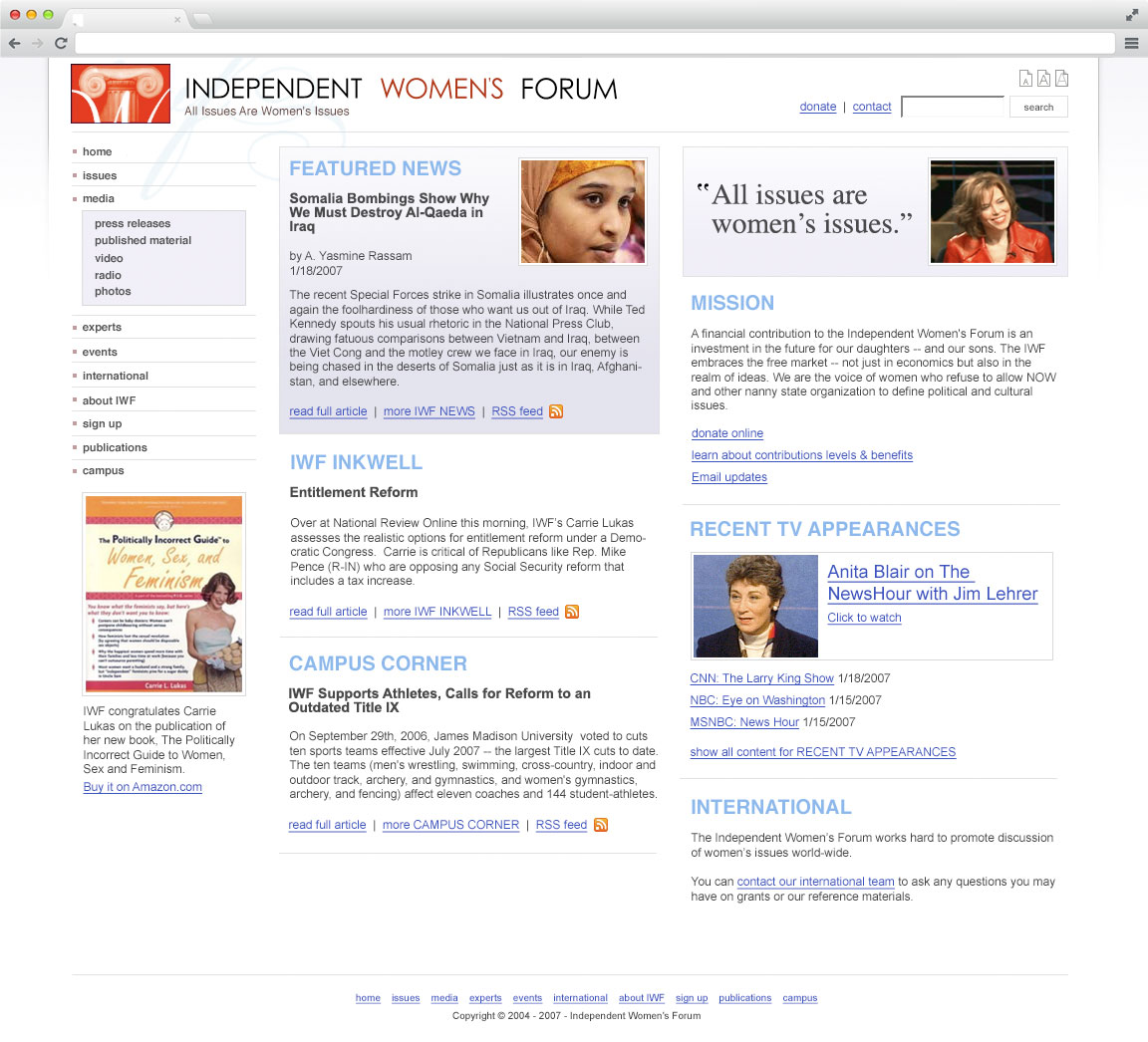
The Independent Women’s Forum came to us in early 2007 for an update on their site design and ended up with the sparkly interface you now see. The design of the site lends itself nicely for a journey through the magical land of color distribution. So grab a cup of coffee and buckle up as the ride begins.

To help explain what we mean by color distribution, take a look at this little map we created using IWF.org as a base.

On occasion, we start layouts by grabbing all the content the client would like to see on the main page, making it black, and dumping it all into a new Photoshop file. Next, we make textual hierarchy changes by pumping up the weight and size for headings and subheadings. After some spacing and alignment changes its ready, but start collecting color only after these steps have been completed

First, we establish any existing colors which will need to be incorporated into our palette due to existing branding. In the example using IWF.org, the red from the logo needed to be added.

We needed to pay attention to an additional client request, which was that we keep the site feeling open and bright. Yellow or yellow used as a gradient is good for this.

You can add two colors to the palette by choosing one with a rich hue (aka saturation), in this case blue, then branch off by grabbing a tint of the same hue.

We also always grab something fairly neutral to use as borders, or for headings and backgrounds which require less emphasis than areas with brighter hues. For IWF.org, we chose a medium gray that is used on all borders and dividing lines.

Now the color palette is ready. Most, if not all of your color usage will be dictated by the palette. You can deviate, but only by shifting the base hue with shades and tints. Start by identifying which elements should use the same color. For example, all links within the main content area need the same color. All first-level headings need the same color as well.

Now you can experiment by using the colors in your palette in these positions. Any colors that are too light can be used for text as long as there is a background behind it with good color contrast to make everything readable.

Remember to use white as a color as well, not just for backgrounds. Any of the colors in your palette can be used for a background, which means any text on top of it can be white (depending on readability).

  • No Comments

ShoutingMat.ch

As described on the about page, ShoutingMat.ch is a civilized retreat untainted by the excesses and whims of the mob.

Huh? Let me explain:

Sites like digg.com and reddit pull in data by relying on a unorganized rabble of internet misfits to strain good internet content from the bad. ShoutingMat.ch looks to a definitive list of the blogs that everyone’s reading, bottling you only the best content from purest sources in the ice cold mountains.

Not only will you drink up high quality content, but each story delivers the blog or origin from whence it came, accessible via a handy drop-down list so simple even a caveman could figure it out.

Here. Me make drawing

  • No Comments

A Clean New Direction for American Spectator

Spectator.org is the newest addition to the list of sites we’ve designed and built.

Since The American Spectator has been around for 1967, keeping the established identity was an important part of the design process. We retained their look by re-using the existing color palette and by keeping the established logo simple in a basic white on red header. Further distributing the red, we threw it into the date-bars, content category headings, third column headings, and buttons. Using the black in the large featured post area serves as the focal point, drawing the eye with an over-sized image and further distributing color. We continued this with the bold black post headings and the background for the active state of the nav list in the right column.

We were also tasked with keeping a good chunk of the content available on the main page without a ton of scrolling. To accomplish this, we kept the spacing between posts on the homepage to a minimum. This expands of course when you click through to read the full article. To create visual separation of content, we used thin borders on the bottom of each post and kept the article headings big compared to the accompanying text.

Along with the re-design, this site has been built on a newly built backend framework which allows for much greater content control by the editors. Additions to the backend are super simple now as well, so any client changes/requests can be managed quickly and efficiently.

Bringing Site Control Out of the Admin Interface

Sometimes it just makes more sense to put the controls right on the site. Watch this quick screencast to find out how we let one of our clients order the stories in their main content well with drag & drop ease.


Bringing Site Control Out of the Admin Interface from Dancing Mammoth on Vimeo.

  • tags: , ,
  • No Comments

All the Little Birds on Jaybird Street, Love to Hear the Mammoth Go Tweet, Tweet, Tweet.

You can now follow our exploits via Twitter, if you feel so inclined.

  • tags:
  • No Comments

Reason’s Giant Leap Into Video

In May of 2007, Reason.com asked Dancing Mammoth for help with a new endeavor: the launch of a website to serve as home for a series of short videos hosted by Drew Carey. In The Drew Carey Project, Drew would take to the street covering important current events and help people think about government in new ways.

We began by creating several mockups in Photoshop, utilizing some existing media to develop cohesive looking examples. With these, they were able to give us great feedback, helping to push the designs forward and moving closer to a design which met their needs.

A few color tweaks, a section or two added to the right column and the design was complete. Reliably serving up high quality video to a potentially massive visitor base was crucial, so we went with the Amazon S3 grid for this. So far this has been the perfect solution as well as an inexpensive one.

Currently, we are re-working the center column a bit to allow for smoother work flow, but the same basic feel will be retained.

Some notes for the CSS geeks

Notice how the text changes color on hover for the “send us your videos” and “Drew Carey Project Archive” areas in the right column? This was accomplished by using an <a> which has this image applied to it using the background declaration. There’s a :hover state for the <a> which shifts the background image up by sixty eight pixels.

Some earlier concepts:

  • tags: , ,
  • 1 Comment

Derived Attributes with UNION

A Story

Recently, a client of ours wanted to institute a “point” system for an existing body of users. The idea was that certain actions of the user would generate points for that user, which the client could then track as part of an incentive program.

But What are “Points”?

At the time, we had a simple “users” table in our database which stored all our user-related data. Now we were asked, essentially, to add a new “points” attribute to the “user” entity. However, we could not simply add a “points” column to the “user” table, because the client needed to track individual point-granting actions separately, with descriptions and such.

But this was also not a one-to-many relationship with an abstract “point-event” entity either, since some points were inferred from information which was properly normalized into other parts of the database. For example, referring another user (information we know at user registration time) was worth a certain number of points, but to copy a “referred user” event to a “point-event” entity would mean denormalizing the database. If a user-referral were added or changed later, we would have to make sure to do the same thing to a corresponding point-event.

Thus a user’s “points” are an attribute of the user, but the value of this attribute is derived from potentially many different entities or attributes. Guess what? It’s a derived attribute (scroll to the bottom).

So, how are we going to deal with this?

Implementation

Derived Columns

Some “real” databases have native support for derived attributes (e.g., SQL Server) but as far as I know they all require that the value of the derived attribute be defined as an expression, not the result of an arbitrary query. We could get around this using a stored function which calculates the points for us, but this particular database was MySQL (which does not support derived attributes), version 4.1 (which does not support stored functions).

In any case, this is a bad solution for us because any changes to the point calculation algorithm would require modification of the database, yet we had been accustomed to putting this kind of logic into the application. Additionally, a lazy SELECT * (many of which were unfortunately sprinkled throughout our application) would suddenly become much more expensive, requiring an additional function call per row.

Application Code

The other solution, of course, is that we simply put all the point-calculation code into the application. The problem with this is that it would take multiple queries to the database for every user that interested us, and we could potentially get the wrong point value if a change were made to the database in between our queries (since MySQL MyISAM does not have transactions). Plus, if we want to sort by points (or something more complicated), we would have to do the sorting ourselves, in the application.

UNION

Clearly, we wanted to handle point calculation by a single query. The solution we finally hit upon was to use a temporary table (not a view, since MySQL 4.1 doesn’t support them) filled by a UNION. This is quite possibly the only good use for a UNION. Each subquery of the UNION would calculate points based on a particular attribute or entity, and all the subqueries would SELECT to common column names.

DROP TEMPORARY TABLE IF EXISTS tmp_all_points;
CREATE TEMPORARY TABLE tmp_all_points
-- Get referrer-derived points
(SELECT user.id AS user_id, COUNT(*)*5 AS points
FROM user ... INNER JOIN ... GROUP BY ...)
UNION
-- Get pointevents-derived points
(SELECT user_id AS user_id, SUM(points) AS points
FROM pointevents GROUP BY user_id HAVING points != 0);

This will give us a temporary table with 0, 1, or 2 rows per user. If we want to limit this to particular users, we can add the relevant WHERE conditions to the individual subqueries before we send them to the database.

Now if we want to do any queries which involve points, we can just treat tmp_all_points as a “points” entity with a many-to-one relationship with the “users” entity.

Want the top five point-holders?

SELECT users.name, SUM(tmp_all_points.points) AS points
FROM users
INNER JOIN tmp_all_points ON users.id = tmp_all_points.users_id
GROUP BY users.id
ORDER BY points DESC
LIMIT 5

Happy Ending?

By using a UNION, we were able to neatly model the derived attribute as a table, using a single query that maps easily to the logic of the derived attribute and is easy to extend to account for any additional criteria that the client may dream up. And we didn’t have to denormalize our database or introduce complex application code.

There is a caveat, however. Tables defined by a query have no index, and probably we are going to want to join on this table, which means we’ll be doing a join without an index. For this reason, it is pretty important to keep the result set of your UNION query as small as possible using additional WHERE conditions.

If your result set will always be large, split off the temporary table creation into a definition with keys and use a INSERT INTO tmp_table SELECT ... UNION SELECT .... Don’t use CREATE INDEX after filling your table, since creating an index on a full table is much slower than building it incrementally (except for FULLTEXT indexes, where the opposite is true).

Don’t Try This With Views

If you are using MySQL 5.0 or above, you won’t be able to mitigate this problem by using a VIEW. MySQL is not very good at optimizing views. If there is not a one-to-one relationship between the rows of your view and the rows of the underlying tables, MySQL will use ALGORITHM = TEMPTABLE for your view. So any view with a UNION in it will be created as a temporary table anyway.

Thus I would not wrap a UNION in a view for this technique, since you can’t control the result set size for a view and you will be generating a new temporary table every time you use the view, instead of once per connection.

Broadband for the People

Technology author and activist Drew Clark turned to Dancing Mammoth when he wanted to make his idea for Broadbandcensus.com into a reality. He envisioned a site capable of providing the most accurate and up-to-date information on broadband technologies to consumers in the United States.

Dancing Mammoth implemented blogs, wikis, speed tests, comments, real time graphs and carrier data into Broadbandcensus.com and designed the clearinghouse Clark imagined.

The first step in the creation of the site involved gathering data for the “What are your broadband internet options?” function. Dancing Mammoth collected data from the FCC and maps from the U.S. postal service. Data was also gathered from individual carriers websites, this data is usually buried deep in the sites, or worse yet, involved some programming knowledge to scrape the data from the sites. We did the scraping and we did the hours of manipulating data to create a tool where users could search their market by zip code.

The website also continues to learn about broadband markets by surveying its users about location, carrier, promised speeds, and an individual’s rating of his service through a census. The survey data, in combination with the search function previously mentioned, a user can automatically correlate carriers to specific zip codes, along with promised speeds and any comments about that location and carrier.

The second part of the census involves a speed test. Broadbandcensus.com has worked closely with Internet2 and Virginia Tech to implement a modified Java-based NDT (Network Diagnostics Tool) client.

Based on the location provided by the user in the census, the site calculates the closest online NDT server accepting connections. The speed test takes approximately 30 seconds and roughly 50 data points are collected during this time, which measure everything from total speed to where bottlenecks in the network are occurring. Once this data is collected it allows the site to display real time percentages of user ratings and percentage of users getting their promised speeds. This is crucial when trying to find the right (only) carrier in your market and makes it a great research tool for consumers.

Broadbandcensus.com is now a publicly available resource that provides real data to consumers about broadband in the U.S. and facilitates consumer research and competition in the broadband carrier sector.

Technologies:

  • Custom ORM Framework written in PHP/MySQL
  • Java
  • Javascript
  • WordPress
  • custom wiki software

Data:

  • 37,000 zipcodes
  • 30,000 Federal datapoints
  • 95,000 relationships
  • 110,000 objects
  • 1500 providers (and growing)

Please Take a Number

In the Internet world of seemingly endless computer resources, it’s not often that a website requires visitors to wait in line to visit, but a recent Dancing Mammoth project called for just that.

The Requirements:

  • Visitors will be added to a Virtual Waiting Room prior to advancing to website content.
  • Visitors will be advanced according to First In First Out.
  • Page must indicate current position in line via a client provided Flash object.
  • An administrator must be able to control flow of traffic.

The client expected light traffic to their video chat feature, so we decided that capturing queue data in a single table was the most efficient way to go. We could then poll at a some set interval to determine a visitor’s place in line, and take action based on the result.

The client-provided Flash object required use of a bit of javascript, so I decided to go ahead and implement the polling with the jQuery library’s ajax functionality — I ♥ jQuery. Here’s what the javascript function looks like:

function updatePosition()
{
	$.ajax({
		type: "GET",
		url: "queue/index.php",
		data: "sess=<?php echo $session_id ?>&random=" + new Date().getTime(),
		dataType: "xml",
		success: function(xml){
			var ky = "";
			var val = "";
			var action = "";
			var pos = 0;
			$("response", xml).each(function(){
				$("action", this).each(function(){
					action = $("key", this).text();
					val = $("value", this).text();
					if(action == "forward")
					{
						// Forward
						forwardToUrl(val);
					}else{
						//Update
						pos = val;
						thisMovie('queueCountdown').update(pos);
					}
				});
			});
		}
	});
}

If you’d like to review all the sample files, you can download them here, but no warranty is expressed or implied.

jQuery sends the visitor’s session id (as well as a random string — always send a random string when making ajax GET calls or IE will give you cached content) to a script that checks the queue and returns some XML with the action and associate value. Then the visitor is either forward to the content, or their position in line is displayed.

On the back end, the VirtualWaitingRoom class provides functionality to retrieve queue position, administratively advance visitors through the queue, and remove records for abandoned sessions.

The project was a success and while there’s nothing especially complex about it, this Virtual Waiting Room is a good short example of how various web technologies can come together to provide a unique solution.

Where To Purchase Your Next Mac

I’ve been to a few Apple stores in the past and I love their clean design. The products they sell are well displayed and their staff are usually very helpful, but I am always looking for a bargain. So I can’t envision myself purchasing a new computer from my local Apple store with the deals that Amazon is currently offering (mail in rebates on all Macs from $25-$150). Below is a chart comparing the Apple store price vs. the Amazon prices for all Mac computers. Shipping is free from both Apple and Amazon, unless of course, you need your Mac shipped express.

With the money that you save by purchasing from Amazon you can increase your RAM, purchase peripherals, or hold onto that money for a rainy day. The choice is rather easy if you look at the prices below. I have added a 5% sales tax to all Apple prices. Your particular sales tax may be higher or lower depending on where you live.

Model Apple Store Price* Amazon Price**
Apple MacBook 13.3″ Laptop (2.4 GHz Intel Core 2 Duo Processor, 2
GB RAM, 160 GB Hard Drive)
$1,363.00 $1,204.99
Apple MacBook 13.3″ Laptop (2.4 GHz Intel Core 2 Duo Processor, 2
GB RAM, 250GB Hard Drive) – Black
$1573.95 $1,398.97
Apple MacBook Pro 15.4″ Laptop (2.4 GHz Intel Core 2 Duo Processor,
2 GB RAM, 200 GB Hard Drive, DVD/CD SuperDrive)
$2098.95 $1,789.99
Apple MacBook Pro 15.4″ Laptop (2.5 GHz Intel Core 2 Duo Processor,
2 GB RAM, 250 GB Hard Drive, DVD/CD SuperDrive)
$2,623.95 $2,289.99
Apple MacBook Pro 17″ Laptop (2.5 GHz Intel Core 2 Duo Processor,
2 GB RAM, 250 GB Hard Drive, DVD/CD SuperDrive)
$2,938.95 $2,557.98
Apple MacBook Air 13.3″ Laptop (1.6 GHz Intel Core 2 Duo Processor,
2 GB RAM, 80 GB Hard Drive)
$1,888.95 $1,689.99
Apple MacBook Air 13.3″ Laptop (1.8 GHz Intel Core 2 Duo Processor,
2 GB RAM, 80 GB Hard Drive)
$2,727.90 $2,743.00
Apple Mac mini (1.83 GHz Intel Core 2 Duo, 1 GB RAM, 80 GB Hard Drive,
Combo Drive)
$628.95 $570.00
Apple Mac mini (2.0 GHz Intel Core 2 Duo, 1 GB RAM, 120 GB Hard Drive,
SuperDrive)
$838.95 $769.99
Apple iMac Desktop with 20″ Display (2.4 GHz Intel Core 2 Duo, 1
GB RAM, 250 GB Hard Drive, DVD/CD SuperDrive)
$1,258.95 $1,144.00
Apple iMac Desktop with 20″ Display (2.66 GHz Intel Core 2 Duo, 2
GB RAM, 320 GB Hard Drive, DVD/CD SuperDrive)
$1,573.95 $1,419.00
Apple iMac Desktop with 24″ Display (2.8 GHz Intel Core 2 Duo, 2
GB RAM, 320 GB Hard Drive, DVD/CD SuperDrive)
$1,888.95 $1,694.00
Apple Mac Pro Desktop (Two 2.8GHz Quad-Core Intel Xeon Processors,
2 GB RAM, 320 GB Hard Drive, 16x SuperDrive)
$2,938.95 $2,589.99
* Apple price includes local/state sales tax of 5% (Sales tax may be higher or lower depending on your location). Amazon price includes mail-in rebate (expirese 7/14/08)
Residents of KS, KY, ND, NY and WA have to pay a sales tax on all Amazon
purchases. (Thank your state legislatures.)
  • tags: , , ,
  • No Comments

Use Your iMac as a Display

I have an Intel iMac (the white kind). It’s my personal machine. I like it. It’s nice. What I especially like about it is that it has a big screen (1680×1050).

I also have an Intel MacBook. It’s my work machine. I like it. It’s nice. But what I don’t like about it is that the screen is a bit smaller than my iMac (1200×800). Using the smaller keyboard and mouse isn’t so nice either.

What to do?

Well, there’s VNC. OS X even has a VNC server built in. So I could turn that on and then use a VNC client on my iMac. But that only gives me the keyboard and mouse and a 1280×800 window mirroring the MacBook screen. Not cool.

The same guy who makes this excellent VNC client also makes ScreenRecycler. ScreenRecycler turns your VNC client into an attached display. The monitor of the computer your VNC client runs on looks to OS X like just another monitor, plugged in through the mini-DVI port. So now I can work on my MacBook and have a 1680×1050 screen in addition. Joy!

But ScreenRecycler ignores input from the VNC client, so I can’t use my iMac’s keyboard and mouse to control my MacBook. No joy.

But some other guy on the internet makes Transport. Transport lets you control other Macs using your keyboard and mouse. Joy has returned!

So, the plan:

  1. Install and run ScreenRecycler and Transport on the MacBook.
  2. Install and run JollysFastVNC and Transport on the iMac.
  3. The VNC client finds ScreenRecycler via Bonjour. No sweat.
  4. On the MacBook, tell Teleport to “Share this Mac.”

All done! Now I can use my iMac as a second display to my MacBook and control my MacBook with my iMac. (I can even make the iMac the MacBook’s main display!) Using the power of Spaces, I can even have multiple workspaces, and keep (for example) Mail and iChat permanently displayed in the MacBook screen, no matter what workspace I’m in.

A caveat: Transport doesn’t seem to recognize the ScreenRecycler display, at least when one machine is Panther (iMac) and the other Leopard (MacBook). You have to arrange your virtual screens in Transport in such a way that they don’t share the same borders. Otherwise your pointer will get stuck on the MacBook.

  • tags: , ,
  • 5 Comments

THE BALLERINAS

  • PJ Doland

    Born in a cross-fire hurricane and he howled at his ma in the driving rain.

    Matt

    Making sure all our websites have at least 15 pieces of flair.

    Erin Doland

    100 percent all-natural high-quality content machine.

    Francis Avila

    Ambidextrously juggling clients and code without breaking a sweat.

    Rachelle Ondiege

    Far too much energy for her own good.